KnottyPlanners Developer Guide
Acknowledgements
This project is based on the AddressBook-Level3 project created by the SE-EDU initiative.
Libraries Used: JavaFX, Jackson, JUnit5
Setting up, getting started
Refer to the guide Setting up and getting started.
Design
Architecture
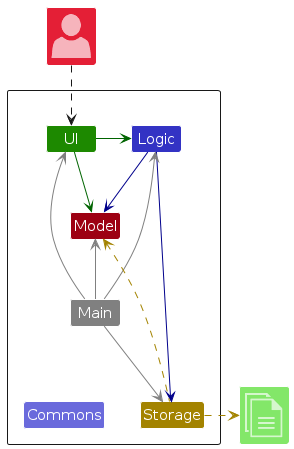
The Architecture Diagram given above explains the high-level design of the App.
Given below is a quick overview of main components and how they interact with each other.
Main components of the architecture
Main (consisting of classes Main and MainApp) is in charge of the app launch and shut down.
- At app launch, it initializes the other components in the correct sequence, and connects them up with each other.
- At shut down, it shuts down the other components and invokes cleanup methods where necessary.
The bulk of the app's work is done by the following four components:
UI: The UI of the App.Logic: The command executor.Model: Holds the data of the App in memory.Storage: Reads data from, and writes data to, the hard disk.
Commons represents a collection of classes used by multiple other components.
How the architecture components interact with each other
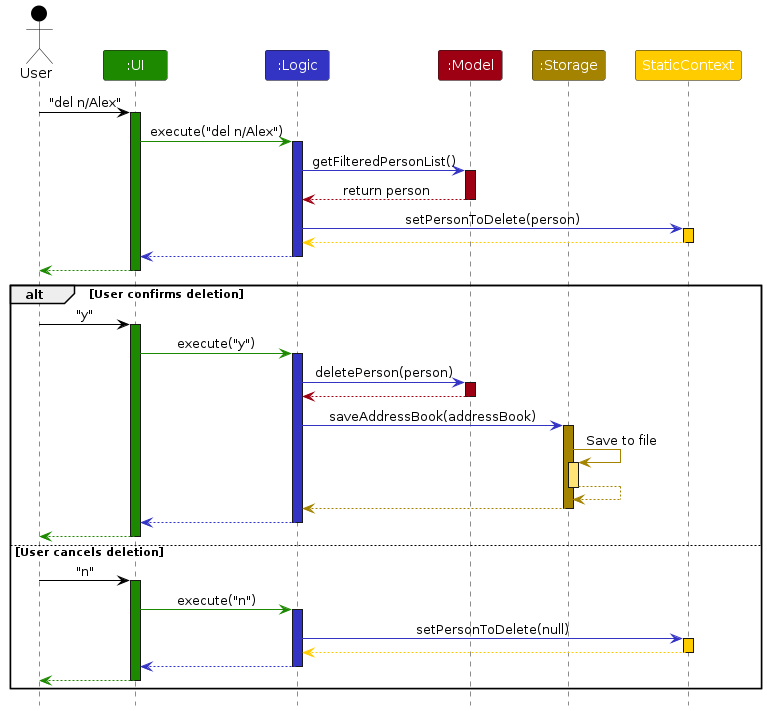
The Sequence Diagram below shows how the components interact with each other for the scenario where the user issues the command del n/Alex.
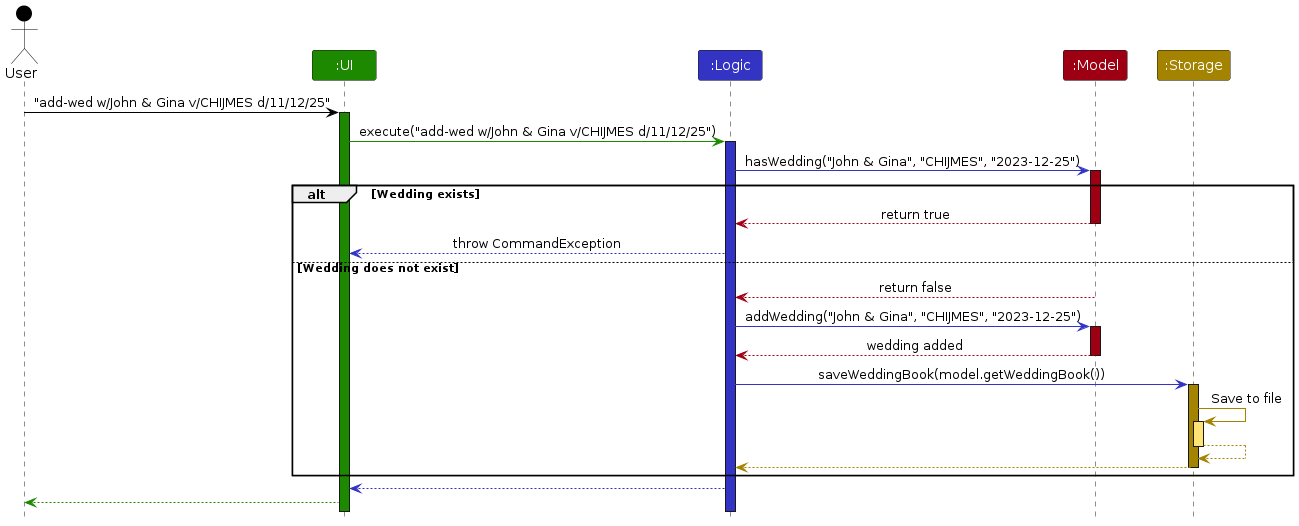
Another Sequence Diagram below shows how the components interact with each other for the scenario where the user issues the command add-wed w/John & Gina v/CHIJMES d/11/12/25.
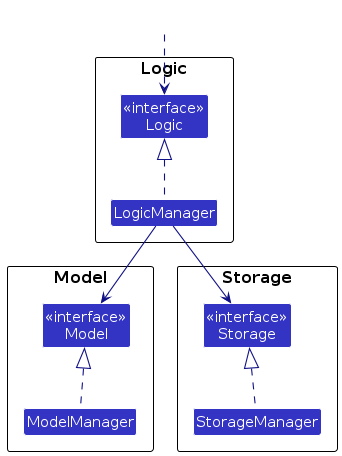
The four main components (also shown in the diagram above, staticContext is not a main component),
- defines its API in an
interfacewith the same name as the Component. - implements its functionality using a concrete
{Component Name}Managerclass (which follows the corresponding APIinterfacementioned in the previous point).
For example, the Logic component defines its API in the Logic.java interface and implements its functionality using the LogicManager.java class which follows the Logic interface. Other components interact with a given component through its interface rather than the concrete class (reason: to prevent outside component's being coupled to the implementation of a component), as illustrated in the (partial) class diagram below.
The sections below give more details of each component.
UI component
The API of this component is specified in Ui.java
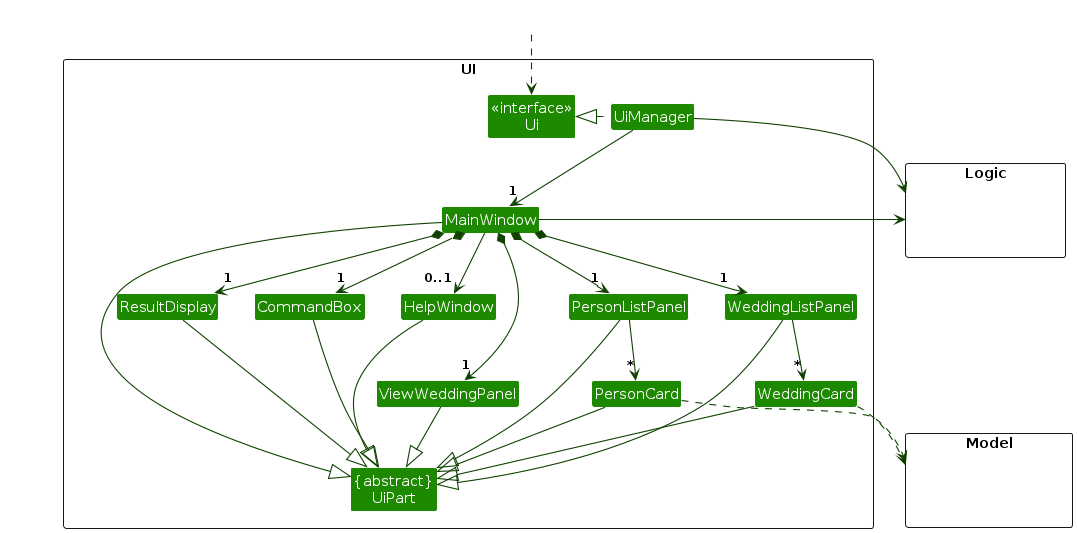
The UI consists of a MainWindow that is made up of parts e.g.CommandBox, ResultDisplay, PersonListPanel etc. All these, including the MainWindow, inherit from the abstract UiPart class which captures the commonalities between classes that represent parts of the visible GUI.
The UI component uses the JavaFX UI framework. The layout of these UI parts are defined in matching .fxml files that are in the src/main/resources/view folder. For example, the layout of the MainWindow is specified in MainWindow.fxml
The UI component,
- executes user commands using the
Logiccomponent. - listens for changes to
Modeldata so that the UI can be updated with the modified data. - keeps a reference to the
Logiccomponent, because theUIrelies on theLogicto execute commands. - depends on some classes in the
Modelcomponent, as it displaysPersonobject residing in theModel.
Logic component
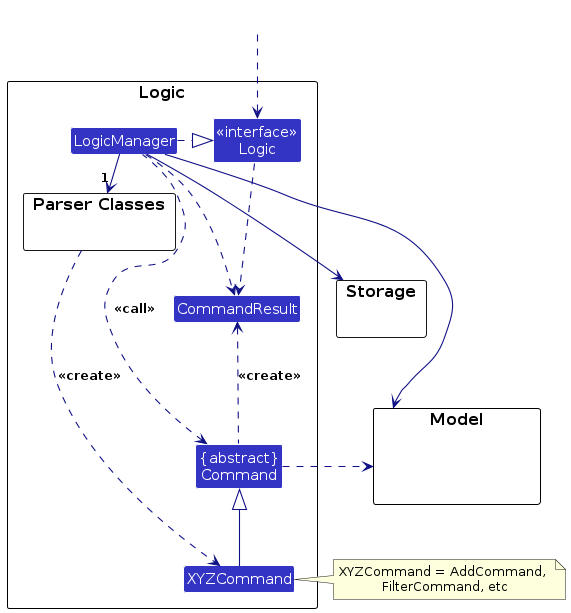
API : Logic.java
Here's a (partial) class diagram of the Logic component:
The sequence diagram below illustrates the interactions within the Logic component, taking execute("view-wed Alex & Mary") API call as an example.
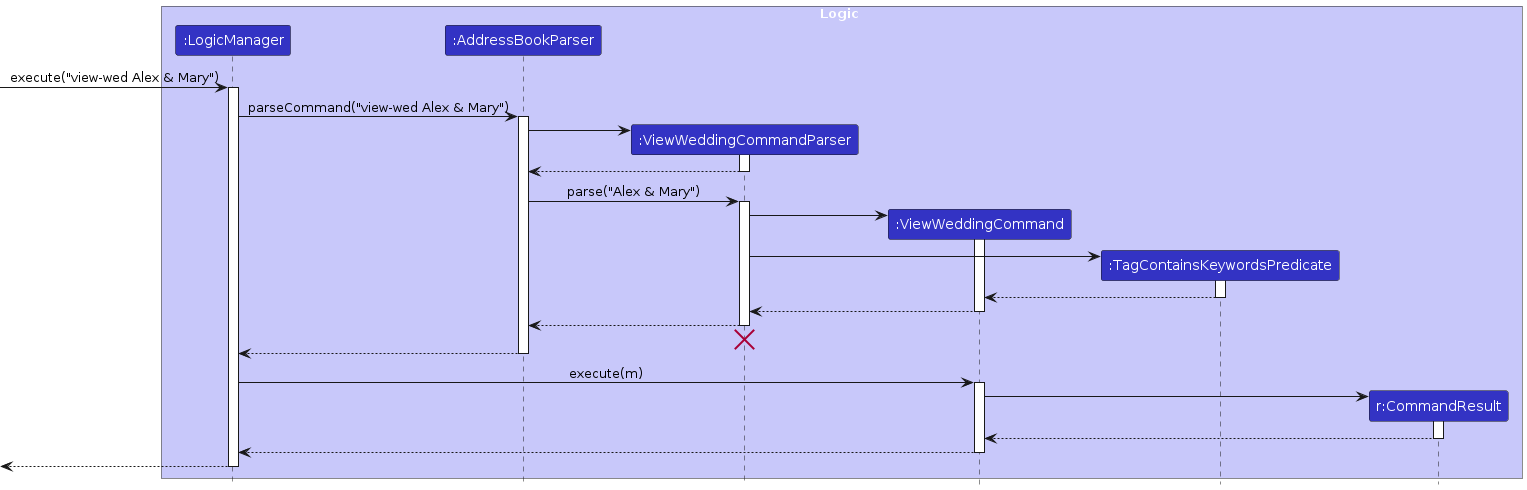
Note: The lifeline for ViewWeddingCommandParser should end at the destroy marker (X) but due to a limitation of PlantUML, the lifeline continues till the end of diagram.
How the Logic component works:
- When
Logicis called upon to execute a command, it is passed to anAddressBookParserobject which in turn creates a parser that matches the command (e.g.,ViewWeddingCommandParser) and uses it to parse the command. - This results in a
Commandobject (more precisely, an object of one of its subclasses e.g.,ViewWeddingCommand) which is executed by theLogicManager. - The result of the command execution is encapsulated as a
CommandResultobject which is returned back fromLogic.
Here are the other classes in Logic (omitted from the class diagram above) that are used for parsing a user command:
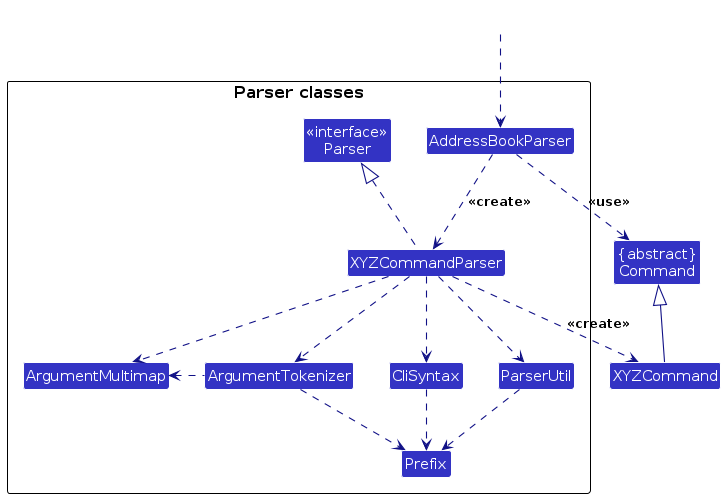
How the parsing works:
- When called upon to parse a user command, the
AddressBookParserclass creates anXYZCommandParser(XYZis a placeholder for the specific command name e.g.,AddCommandParser) which uses the other classes shown above to parse the user command and create anXYZCommandobject (e.g.,AddCommand) which theAddressBookParserreturns back as aCommandobject. - All
XYZCommandParserclasses (e.g.,AddCommandParser,DeleteCommandParser, ...) inherit from theParserinterface so that they can be treated similarly where possible e.g, during testing.
Model component
API : Model.java
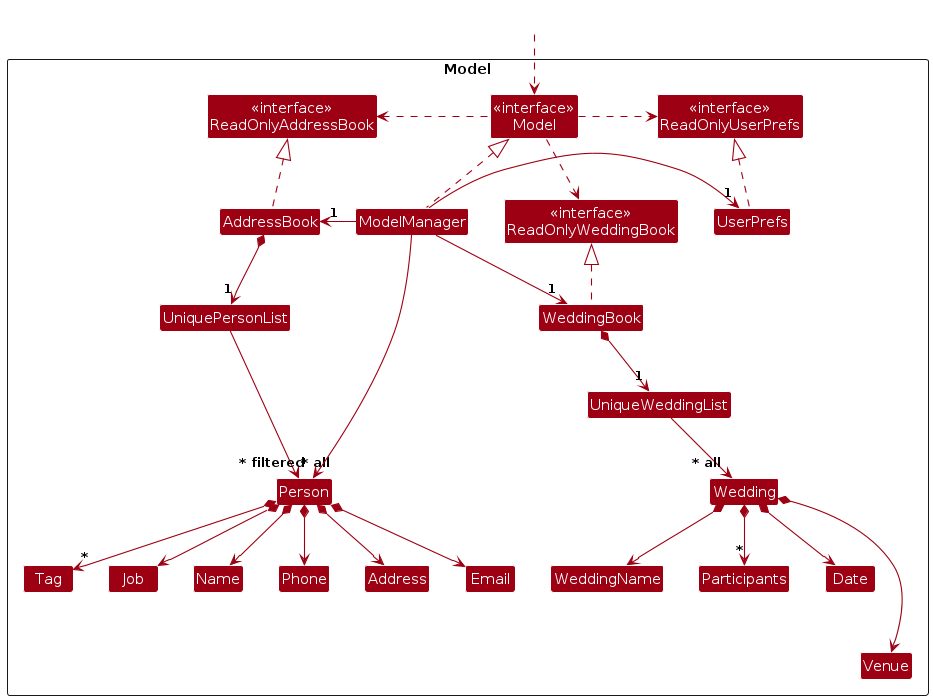
The Model component,
- stores the address book data i.e., all
Personobjects (which are contained in aUniquePersonListobject). - stores the wedding book data i.e., all
Weddingobjects (which are contained in aUniqueWeddingListobject). - stores the currently 'selected'
Personobjects (e.g., results of a search query) as a separate filtered list which is exposed to outsiders as an unmodifiableObservableList<Person>that can be 'observed' e.g. the UI can be bound to this list so that the UI automatically updates when the data in the list change. - stores the currently 'selected'
Weddingobjects (e.g., results of a search query) as a separate filtered list which is exposed to outsiders as an unmodifiableObservableList<Wedding>that can be 'observed' e.g. the UI can be bound to this list so that the UI automatically updates when the data in the list change. - stores a
UserPrefobject that represents the user’s preferences. This is exposed to the outside as aReadOnlyUserPrefobjects. - does not depend on any of the other three components (as the
Modelrepresents data entities of the domain, they should make sense on their own without depending on other components).
Storage component
API : Storage.java
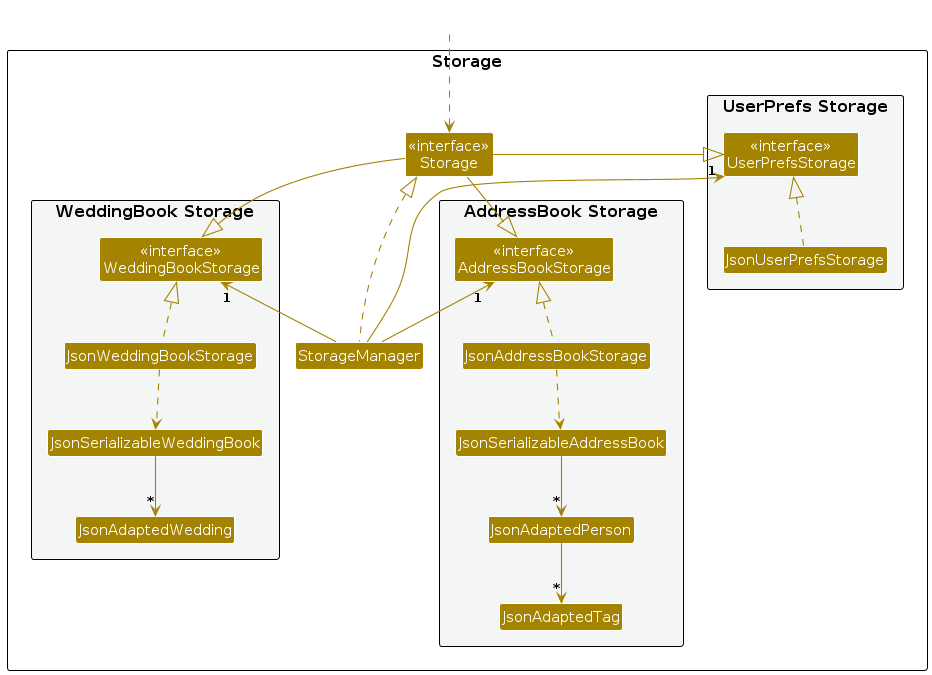
The Storage component,
- can save address book data, wedding book data and user preference data in JSON format, and read them back into corresponding objects.
- inherits from
AddressBookStorage,WeddingBookStorageandUserPrefStorage, which means it can be treated as either one (if only the functionality of only one is needed). - depends on some classes in the
Modelcomponent (because theStoragecomponent's job is to save/retrieve objects that belong to theModel).
Common classes
Classes used by multiple components are in the seedu.address.commons package.
Implementation
This section describes some noteworthy feature implementation details of KnottyPlanners.
Wedding - Class for Wedding Events
The Wedding class represents a wedding event in KnottyPlanners. It includes details such as the wedding name, venue,
date and participants. The Wedding class supports the following functions:
Add Wedding: Creates a newWeddingin KnottyPlanners.Delete Wedding: Deletes an existingWeddingfrom KnottyPlanners and the associated tags.List Weddings: Lists allWeddingsin KnottyPlanners.View Wedding: Displays participants of a specificWedding.
Refer to our User Guide for more information on how to use these functions associated with the Wedding Class.
StaticContext - Confirmation Prompting for Deletion and Clear Commands
StaticContext is a utility class used to manage the state of pending operations in KnottyPlanners. It helps in handling deletion and clear commands by maintaining boolean flags and references to the entities to be deleted or cleared.
The StaticContext class supports the following functions:
| Function | Associated Command |
|---|---|
setClearAddressBookPending | clear-ab / cab |
setClearWeddingBookPending | clear-wb / cwb |
setPersonToDelete | del n/NAME |
setWeddingToDelete | del-wed w/NAME & NAME / dw w/NAME & NAME |
Here is an example usage scenario and how StaticContext is used in KnottyPlanners.
The user requests to delete a
Wedding.StaticContext.setWeddingToDelete(wedding)is called to set theWeddingto be deleted.The user confirms the deletion. The
DeleteYCommandchecksStaticContext.getWeddingToDelete()and proceeds with the deletion.The user requests to clear the wedding book.
StaticContext.setClearWeddingBookPending(true)is called to set the clear operation as pending.The user confirms the clear operation. The
DeleteYCommandchecksStaticContext.isClearWeddingBookPending()and proceeds with clearing the wedding book.
Design Considerations:
Strict Command Guidelines:
- Commands are designed to be strictly followed in their execution.
- For example, any command that requires a confirmation prompt must be followed by a
yornto proceed or cancel the operation respectively. - This ensures that the user is aware of the operation being performed and prevents accidental deletions or clear operations.
- Pros: Prevents accidental deletions or clear operations.
- Cons: Executing other commands before
yornthat modify the intended deletion or clear operation may lead to unexpected results. (We have implemented checks to prevent this)
- For example, any command that requires a confirmation prompt must be followed by a
tag-del does not require confirmation:
- The
tag-delcommand does not require a confirmation prompt.- This is because the operation is reversible and does not have a significant impact on the data.
- It is akin to adding a label to a contact, which can be removed without any significant consequences.
- Pros: Saves time by not requiring a confirmation prompt for a reversible operation.
- Cons: Users may not be satisfied that deletion operations are not consistent throughout with a confirmation prompt.
Documentation, logging, testing, configuration, dev-ops
Appendix: Planned Enhancements
1. Prefix Enhancements
Currently: The view wedding command in KnottyPlanners does not require a need for a prefix to represent the wedding. Thus, when associating a wedding to a Person, it is done by tagging them to it, making the prefix 't/'.
Plan: To make the association of Wedding and Person more intuitive, we will change the prefix from 't/' to 'w/', representing the Wedding that a Person is associated with.
2. Forced Deletion and Clearing
Currently: To prevent accidental deletions and clearing of data in KnottyPlanners, a user confirmation is currently required to ensure that the action is intentional.
Plan: To include a force deletion or clearing command that enables the user to remove the data without KnottyPlanners requiring a confirmation from them, to increase efficiency.
3. Improved Filtering
Currently: The filter command in KnottyPlanners supports filtering by the name or job fields only.
Plan: To allow users to filter with other fields such as phone number, address and email.
4. Allow Copying of Information
Currently: KnottyPlanners is optimised for keyboard usage, and direct copying of information from the GUI is not supported.
Plan: To allow the users of KnottyPlanners to copy information directly from the contact or wedding cards, in order to facilitate mouse usage. We will also include a feature to export the information to a text file or csv file for easy sharing.
5. Support for Long Inputs
Currently: KnottyPlanners only support inputs up till a reasonable amount of characters. As such, extreme inputs that exceed our limit can potentially hinder the viewing of information when the user does not resize the window.
Plan: To handle extreme inputs of all fields with a long character count, ensuring that the information can still remain visible.
6. Index Referencing
Currently: KnottyPlanners requires users to select the Person from their names in order to reduce ambiguity. However, this can result in inefficiency when handling extremely long names.
Plan: To allow users to reference the contact or wedding based on their index in the list, in addition to our current implementation. This ensures that the efficiency of KnottyPlanners is maintained.
7. Further CLI Support
Currently: Opening the help window creates an external popup that requires the user to close with a mouse or trackpad.
Plan: Enhance CLI optimisation by allowing the user to close the popup without using a mouse or trackpad.
8. Contacts and Weddings Visibility
Currently: The address and wedding lists are in two separate views to help the wedding planner to be more focused and reduce cluttering of information. This can lead to an additional need to toggle between the wedding book and address book to recall the names of the wedding.
Plan: To have an integrated view that contains both the persons and weddings side by side, allowing the association of persons to weddings to be done with less memory work.
9. Comprehensive Language Support
Currently: KnottyPlanners supports names in English language without special characters such as "^" or non-English names.
Plan: To have a more comprehensive language allowance for names with special characters and non-English names, making KnottyPlanners more inclusive. To maintain checks for incorrect entry of data, KnottyPlanners will then prompt the user if special characters have been used.
Appendix: Requirements
Product scope
Target user profile:
- Wedding planners who organise multiple weddings concurrently
- Possesses a need to manage a significant number of contacts with various roles
- Requires efficient categorisation of all stakeholders in a wedding
- Can type fast and prefers typing to mouse interactions
- Is reasonably comfortable using CLI apps
Value proposition: Manage contacts of all stakeholders of multiple weddings with ease and convenience.
User stories
Priorities: High (must have) - * * *, Medium (nice to have) - * *, Low (unlikely to have) - *
| Priority | As a … | I want to … | So that I can… |
|---|---|---|---|
* * * | Wedding Planner | Add contact details | I can store contacts in my address book |
* * * | Wedding Planner | Delete contacts | I can remove contacts I no longer need |
* * * | Wedding Planner | List all contacts | I can view all my clients and wedding vendors |
* * | Wedding Planner | Edit contact details | I can keep information as up-to-date and accurate as possible |
* * | Wedding Planner | Filter contacts by name and/or job | I can quickly find the contact(s) I need |
* * | Wedding Planner | Create weddings | I can manage all details specific to that wedding |
* * | Wedding Planner | Delete weddings | I can remove weddings once they are over |
* * | Wedding Planner | List all weddings | I can view all weddings that I am planning |
* * | Wedding Planner | View all contacts associated with a wedding | I can easily view which stakeholders are involved in that wedding |
* * | Wedding Planner | Tag my contacts to a wedding | I can group relevant stakeholders and attendees of a wedding together |
* * | Wedding Planner | Un-tag my contacts from a wedding | I can remove relevant stakeholders and attendees who are no longer associated with that wedding |
* | Wedding Planner | Create and manage guest lists for each wedding | I can track RSVPs and dietary preferences |
* | Wedding Planner | Track vendor bookings for each wedding | I can ensure all necessary services are confirmed |
* | Wedding Planner | Rate or review vendors after each event | I can assess their performance for future recommendations |
* | Wedding Planner | Set reminders to contact specific vendors/clients | I can correspond with them on time without missing any important deadlines |
Use cases
(For all use cases below, the System is the KnottyPlanners and the Actor is the User, unless specified otherwise)
Use case: UC01 - Delete a contact
MSS
User requests to list contacts
KnottyPlanners shows a list of contacts
User requests to delete a specific contact in the list
KnottyPlanners shows a confirmation prompt
User confirms the deletion
KnottyPlanners deletes the contact
Use case ends.
Extensions
2a. The list is empty.
Use case ends.
3a. The given contact name is invalid.
3a1. KnottyPlanners shows an error message.
Use case ends.
5a. The user cancels the deletion.
Use case ends.
Use case: UC02 - Add a contact
MSS
User requests to list contacts
KnottyPlanners shows a list of contacts
User requests to add a new contact
KnottyPlanners adds the new contact
Use case ends.
Extensions
3a. The given contact details are invalid.
3a1. KnottyPlanners shows an error message.
Use case resumes at step 2.
3b. The contact already exists.
3b1. KnottyPlanners shows an error message.
Use case resumes at step 2.
Use case: UC03 - Add a tag to a contact
MSS
User requests to tag a wedding to a person
KnottyPlanners tags the person to the wedding
Use case ends.
Extensions
1a. The wedding is not yet created.
1a1. KnottyPlanners shows an error message.
Use case resumes at step 1.
1b. The given wedding name is in an invalid format.
1b1. KnottyPlanners shows an error message.
Use case resumes at step 1.
1c. The given contact name is invalid.
1c1. KnottyPlanners shows an error message.
Use case resumes at step 1.
1d. The tag already exists for that contact.
1d1. KnottyPlanners shows an error message.
Use case ends.
Use case: UC04 - Delete a tag from a contact
MSS
User requests to list contacts
KnottyPlanners shows a list of contacts
User requests to delete a tag from a specific contact in the list
KnottyPlanners deletes the tag from that contact
Use case ends.
Extensions
2a. The list is empty.
Use case ends.
3a. The given name is invalid.
3a1. KnottyPlanners shows an error message.
Use case resumes at step 2.
3b. The tag does not exist for that contact.
3b1. KnottyPlanners shows an error message.
Use case resumes at step 2.
3c. The tag is not associated with any wedding.
3c1. KnottyPlanners shows an error message.
Use case resumes at step 2.
Use case: UC05 - View all Contacts associated with a Wedding
MSS
User requests to list weddings
KnottyPlanners shows a list of weddings
User requests to view all contacts for a specific wedding in the list
KnottyPlanners shows a list of contacts associated with that wedding (if any)
Use case ends.
Extensions
2a. The list is empty.
Use case ends.
3a. The given wedding name is invalid or does not exist.
3a1. KnottyPlanners shows an error message.
Use case resumes at step 2.
Use case: UC06 - Search for a specific contact by name
MSS
User requests to search for contacts by name criteria
KnottyPlanners shows a list of contacts that matches the name criteria
Use case ends.
Extensions
1a. The given criterion is invalid.
1a1. KnottyPlanners shows an error message.
Use case resumes at step 1.
2a. There are no contacts that matches the name.
2a1. KnottyPlanners shows an empty list.
Use case ends.
Use case: UC07 - Search for a specific contact by job
MSS
User requests to search for contacts by job criteria
KnottyPlanners shows a list of contacts that match the job criteria
Use case ends.
Extensions
1a. The given criterion is invalid.
1a1. KnottyPlanners shows an error message.
Use case resumes at step 1.
2a. There are no contacts that matches the job.
2a1. KnottyPlanners shows an empty list.
Use case ends.
Use case: UC08 - Edit a contact's details
MSS
User requests to list contacts
KnottyPlanners shows a list of contacts
User requests to edit details of a specific contact
KnottyPlanners updates the details for that contact
Use case ends.
Extensions
2a. The list is empty.
Use case ends.
3a. The given contact name is invalid.
3a1. KnottyPlanners shows an error message.
Use case resumes at step 2.
3b. The new contact details given are invalid.
3b1. KnottyPlanners shows an error message.
Use case resumes at step 2.
Use case: UC09 - Adding a new wedding
MSS
User requests to list weddings
KnottyPlanners shows a list of weddings
User requests to add a new wedding
KnottyPlanners adds the new wedding
Use case ends.
Extensions
3a. The given wedding name is invalid or fields are missing/invalid.
3a1. KnottyPlanners shows an error message.
Use case resumes at step 2.
3b. The wedding already exists.
3b1. KnottyPlanners shows an error message.
Use case resumes at step 2.
Use case: UC10 - Deleting a wedding
MSS
User requests to list weddings
KnottyPlanners shows a list of weddings
User requests to delete a specific wedding in the list
KnottyPlanners shows a confirmation prompt
User confirms the deletion
KnottyPlanners deletes the wedding
Use case ends.
Extensions
2a. The list is empty.
Use case ends.
3a. The given wedding name is invalid.
3a1. KnottyPlanners shows an error message.
Use case resumes at step 2.
3b. The wedding does not exist.
3b1. KnottyPlanners shows an error message.
Use case resumes at step 2.
5a. The user cancels the deletion.
Use case ends.
Use case: UC11 - Clearing Address or Wedding Book
MSS
User requests to clear the address book or wedding book
KnottyPlanners shows a confirmation prompt
User confirms the deletion
KnottyPlanners clears the address book or wedding book
Use case ends.
Extensions
2a. The address book or wedding book is already empty.
Use case ends.
3a. The user cancels the deletion.
Use case ends.
Non-Functional Requirements
- The system should work on any mainstream OS as long as it has Java
17or above installed. - The system should be able to hold up to 1000 persons without noticeable sluggishness in performance for typical usage.
- A user with an above-average typing speed (approximately 60 words per minute) for regular English text (i.e. not code, not system admin commands) should be able to accomplish most of the tasks faster using keyboard commands than using the mouse.
- The system should return a response to commands that the user inputs within 3 seconds.
- The codebase should be compliant with KnottyPlanners architecture and logic to facilitate easier testing and debugging.
- The system should be operational and responsive 24/7.
Glossary
- Contact: An individual or organization associated with wedding planning, such as a client or vendor.
- Job: Role of a person during the weddings, e.g., caterers, florists, or photographers.
- Tag: Refers to a wedding tag, a label assigned to a contact to associate them with a specific wedding event, can be assigned to multiple contacts involved in the same wedding event.
- AddressBook: The main data model that represents the collection of all 'Person' objects within KnottyPlanners.
- WeddingBook: The data model that represents the collection of all 'Wedding' objects within KnottyPlanners.
- Priority: The relative importance of a user story or task, often categorized as must-have, should-have, or could-have.
- Success/Failure Messages: Feedback provided to the user indicating the outcome of a command (e.g., contact successfully added or an error message).
- Confirmation Prompt: A message that asks the user to confirm an action before proceeding (e.g., deleting a contact).
Appendix: Instructions for manual testing
Given below are instructions to test the app manually.
Note: These instructions only provide a starting point for testers to work on; testers are expected to do more exploratory testing using the User Guide.
Launch and shutdown
Initial launch
Download the jar file and copy it into an empty folder.
Double-click the jar file Expected: Shows the GUI with a set of sample contacts. The window size may not be optimum.
Saving window preferences
Resize the window to an optimum size. Move the window to a different location. Close the window.
Re-launch the app by double-clicking the jar file.
Expected: The most recent window size and location is retained.
Adding a person
Adding a person
- Test case:
add n/John Doe p/98765432 e/johnd@example.com a/John street, Blk 123, #01-04 j/PhotographerExpected: Success message with John Doe's details shown. UI displays person list. - Incorrect add command to try:
add n/John Doe p/98765432 e/johnd@example.com
Expected: Error message due to invalid command shown.
- Test case:
Deleting a person
- Deleting a person that exists in AddressBook
- Test case:
del n/Alexfollowed byy
Expected: Confirmation Prompt with Alex's details shown. Alex is then deleted. UI displays person list. - Test case:
del n/Jonusfollowed byn
Expected: Delete operation cancelled and no person is deleted. UI displays person list. - Incorrect delete command to try:
del,del 123123
Expected: Error message due to invalid command shown.
- Test case:
Editing a person
Editing a person that exists in AddressBook
- Test case:
edit n/Alex new/John Doe
Expected: Success message with edited details shown. UI displays person list. - Incorrect edit command to try:
edit n/Alex t/Alex & John Doe
Expected: Error message stating tags cannot be edited shown.
- Test case:
Filtering a person
Filtering a person based on name and job
- Test case:
filter n/John j/Photographer
Expected: Success message with number of persons filtered. UI displays filtered person list with either nameJohnor jobPhotographeror both nameJohnand jobPhotographer. - Incorrect edit command to try:
filter John
Expected: Error message due to invalid command shown.
- Test case:
Adding a wedding
Adding a wedding
- Test case:
add-wed w/James Hauw & Rachel Loh v/Pan Pacific Hotel d/11/03/2025
Expected: Success message with wedding details shown. UI displays wedding list. - Incorrect add wedding command to try:
add-wed v/Pan Pacific Hotel d/11/03/2025
Expected: Error message due to invalid command shown. - Other incorrect add wedding to try:
add-wed w/James Hauw and Rachel Loh v/Pan Pacific Hotel d/11/03/2025
Expected: Error message stating the correct wedding name format.
- Test case:
Deleting a wedding
Deleting a wedding that exists in WeddingBook
- Test case:
del-wed w/Jonus Ho & Izzat Syazanifollowed byy
Expected: Confirmation prompt with wedding details shown. Wedding is then deleted. UI displays wedding list. - Test case:
del-wed w/Jonus Ho & Izzat Syazanifollowed byn
Expected: Delete operation cancelled and no wedding is deleted. UI displays wedding list. - Incorrect delete command to try:
del-wed,del-wed Jonus & Izzat
Expected: Error message due to invalid command shown.
- Test case:
Adding a Tag
Adding a tag of an existing wedding in WeddingBook to a person
- Test case:
tag-add n/Jonus t/James Hauw & Rachel Loh
Expected: Success message stating that person is added to a wedding. UI displays person list. - Incorrect add wedding command to try:
tag-add n/Jonus w/James Hauw & Rachel Loh
Expected: Error message due to invalid command shown.
- Test case:
Deleting a tag
Deleting a tag of an existing wedding in WeddingBook of a person
- Test case:
tag-del n/Jonus t/James Hauw & Rachel Loh
Expected: Success message stating that person is removed from a wedding. UI displays person list. - Incorrect add wedding command to try:
tag-del n/Jonus w/James Hauw & Rachel Loh
Expected: Error message due to invalid command shown.
- Test case:
GUI
Showing person list
- Test case:
list
Expected: Success message with total number of persons. UI displays person list.
- Test case:
Showing wedding list
- Test case:
list-wed
Expected: Success message with total number of weddings. UI displays wedding list.
- Test case:
Showing help window
- Test case:
help
Expected: UI displays help window.
- Test case:
Saving data
Dealing with corrupted data files
Using the relevant
addoradd-wedcommands, create dummy data that is to be stored in the storage.To simulate a corrupted file, locate the addressbook.json or weddingbook.json file in the data folder.
Delete a random line in the .json file, and relaunch KnottyPlanners. Expected: KnottyPlanners will launch with all previous data wiped and cleared.